
Supermarket Website Design and Development
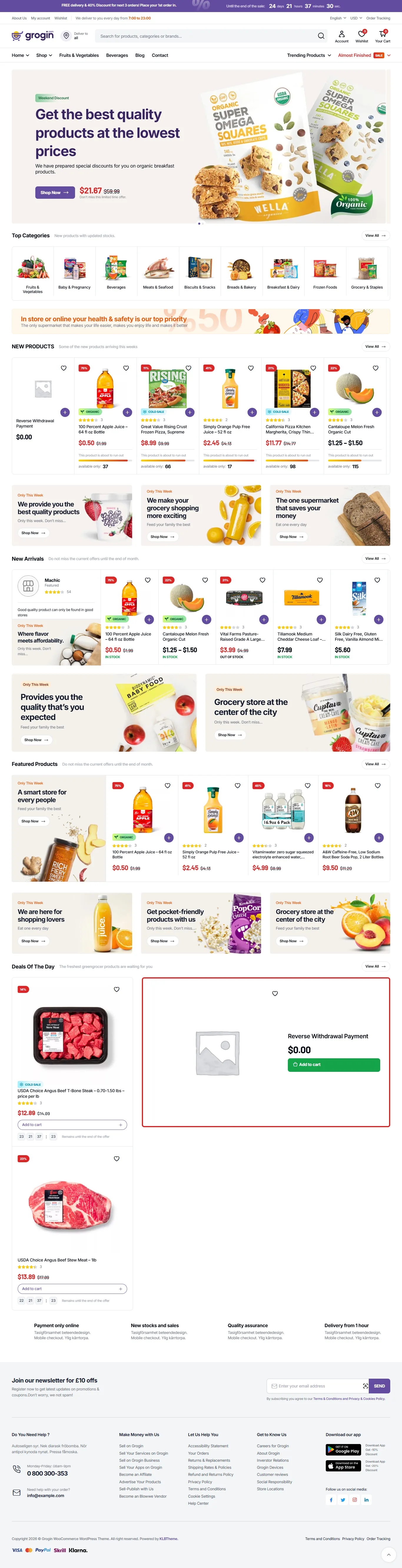
We provide supermarket website design and development services to help grocery businesses showcase products, highlight daily deals, manage categories, and offer convenient online shopping for fresh produce and household essentials.
Standard
What's Included
Available Add-ons
Custom Supermarket Website Design and Development for Grocery Businesses
Before she leaves home a customer pulls up your supermarket on her phone. What’s on offer this week? What time do you close? Another shopper is ready to order groceries for pickup. Both need to know where to go on your website.
For businesses across the USA The Custom Websites provides Supermarket Website Design and Development. Customers can see your range and plan their next visit. If online ordering is part of your operation the site can also support preparing groceries and handing them over.
First we need to understand how your supermarket runs. Showing a product catalog is different from managing delivery slots or substitutions. Those requirements get worked out before we start building.
Give Customers a Clear Way to Shop With Your Supermarket
Weekly deals might be all someone wants to check before heading to your store. Someone else needs to order a full basket from home. And a shopper picking up a few things won’t always have the same questions as someone buying for the week.
With Supermarket Business Website Development those needs shape the features. Opening hours and a searchable catalog may cover what your store requires. Selling online brings payment requirements too along with the work of handling orders.
It comes down to how you operate. Someone on your team has to manage each feature you add.
Custom Website Design for Supermarkets
Your products and the way people search for them come first in Custom Supermarket Website Design. Regular shoppers should recognize your store when they arrive on the site. New visitors need to know where to go.
Supermarket Website Design Based on Your Brand
Approved photography and your store colors give the design a starting point. Existing signage helps tie the site to the supermarket people already know.
With our Supermarket Website Design Services those details become a design your team can check before development starts.
Custom Website Layouts and Visual Design
If promotions change often you may want offers high on the homepage. For another supermarket getting shoppers straight to grocery departments may matter more.
Those priorities guide the layout. Customers shouldn’t have to work through details they don’t need at that point.
Supermarket Website Navigation and User Experience
Where would a shopper expect to find an everyday product? Clear department names help them narrow a broad category down to the item they need.
Through Supermarket Web Design Services those paths sit alongside store details and support pages so customers know their way around.
Responsive Website Design for Mobile and Desktop
With Responsive Supermarket Website Design the layout changes to fit the customer’s screen. Prices must remain readable with enough space to tap product controls.
We review desktop and tablet layouts as well. Browsing and managing a basket should feel comfortable on each device.
Product Page and Grocery Category Design
Shoppers use category pages to browse departments such as frozen foods or fresh produce. Once they open a product page they need details about that item.
Professional Supermarket Website Design puts purchase options and pack sizes where customers can see them beside the price.
Supermarket Website Development Services
Development turns the design into something customers and staff can use. The design sets out how the site looks. The build covers customer pages along with the tools staff use to maintain products or deal with orders.
Custom Supermarket Website Development
A standard setup may not cover branch-specific catalogs or limits on certain products. Custom Supermarket Website Development can support requirements like these.
But the rules need agreeing first. The scope sets out each feature’s job and how your staff will use it.
Frontend and Backend Website Development
What customers see and interact with comes under Frontend Development. The records and rules that make those pages work sit within Backend Development.
Our role as a Supermarket Web Development Company is to connect them so changing a product selection brings back the correct information.
CMS-Based Supermarket Website Development
Approved staff can use a content management system to change promotional banners or store announcements. They shouldn’t need development work for every routine edit.
Access can reflect each person’s responsibilities. Permissions keep sensitive settings restricted while staff work on the content they manage.
Custom Supermarket Web Application Development
A staff picking screen might be needed outside your usual storefront. Any tool like that needs a discussion about its requirements before building starts.
Through Custom Web Development the application can connect to the records staff need and let them retrieve or update information in the agreed format.
Supermarket Website Redesign and Modernization
If ordering no longer fits your operation or navigation is awkward Supermarket Website Redesign Services can address it. Content that still helps customers can stay.
Where applicable customer records and existing URLs need a migration plan. That transition belongs in the project scope too.
E-Commerce Website Development for Supermarkets
Checkout is only part of an online grocery order. Staff still have to pick the products and get them ready for delivery or collection. That work needs to be reflected in Supermarket E-Commerce Website Development.
Online Supermarket Setup and Development
The storefront and the settings behind it are covered by Online Supermarket Website Development. Shopping pages need to be clear and staff need an order area they can use.
Agreed features get configured before launch. These may include guest checkout or notifications when a new order comes in.
Grocery Product Catalog and Category Management
Categories should follow how people shop. Consistent entry rules for pack sizes and shared attributes make similar products easier for customers to compare.
Staff need to work with the catalog too. Its structure should make adding products and maintaining published information practical.
Shopping Cart and Checkout Development
Changing a quantity shouldn’t cost a shopper the rest of their order. Selected items need to stay visible in the cart with any applicable order limits explained.
Checkout brings that basket together with the payment method and available fulfillment choices. Field errors should appear beside what needs fixing.
Payment Gateway Integration
The website connects to an approved payment provider through a Payment Gateway. Your provider account and platform determine the available methods and how payments are handled.
Before launch we check successful payments and declined transactions. Canceled payment attempts need testing as well.
Customer Accounts and Repeat Ordering
Returning shoppers may use Customer Accounts to check past orders or update saved addresses. Guest purchasing can stay available where it fits your operation.
A previous order can help someone rebuild their basket. Still the prices and availability must reflect what’s current.
Delivery, Pickup, and Order Management
Agreed pickup or delivery arrangements can connect with orders through Supermarket E-Commerce Development Services. Staff need to know how each order gets to its customer.
Tax settings depend on your supplied requirements and supported platform services. The applicable rules should be confirmed by your tax adviser.
Essential Features of a Supermarket Website
The questions customers ask while shopping guide useful Supermarket Website Solutions. Your catalog matters here. So do your operating rules. Features should come from those details rather than a standard list.
Grocery Search and Product Filters
When someone searches for a certain pack size the results need to be relevant. Search can draw on product names and agreed catalog attributes.
Customers can use filters to narrow results by brand or department. Removing a filter selection should be clear too.
Product Images, Pack Sizes, and Descriptions
Customers often recognize a product from its photo. Before ordering they also need the pack size and other approved information in the description.
Each variation must link to the correct record. That’s how the selected size gets its matching image and price.
Ingredient and Allergen Information
Your business can supply ingredient and allergen information for relevant product pages. Shoppers need access to those details before choosing what to buy.
Keeping the content current and reviewing it sits with your team. Product labeling isn’t independently verified through website development.
Inventory and Stock Availability
What the site says about stock depends on what your systems can tell it. A branch’s shelves may hold different quantities from the availability shown online.
Before launch we need agreed rules for unavailable items. Customers should know what happens when a product can’t be supplied.
Weekly Offers and Promotional Pages
Shoppers can check current deals on a dedicated offers page. Approved staff need to be able to change prices and take down promotions that have expired.
Conditions belong where customers choose the offer. Eligible products and promotion dates also need consistent records.
Store Locator and Location Pages
Customers can use a Store Locator to choose the right branch. Its location page can give them the address and current opening hours.
They may also need parking details or pickup instructions. With that information they can plan a visit without first calling the store.
Customer Support and Order Questions
An order problem or a question about a product needs a route to the right staff member. A short form can provide that route.
How your team responds should guide the support options. A help page may fit or you might use an existing chat service.
Plan Online Grocery Orders Around Your Store Operations
Ordinary checkout rules don’t always cover grocery orders. Staff need to know what comes next after a customer buys. Customers do too. Agreeing on the details early helps make that clear.
Delivery Areas and Postcode Checks
Before filling a basket people need to know if their address is covered. Postcode checks can work from the delivery areas your business provides.
If an address is outside those areas the site should explain that. Other available options can be shown where applicable.
Pickup and Delivery Slot Management
Your staff can only prepare so many orders. Available slots need to reflect that capacity with cutoff times based on the real picking and fulfillment schedule.
Once capacity is reached slot rules can stop further bookings. A clearly assigned staff member needs to own changes to those rules.
Product Substitution Preferences
Customers need to state their preferences if substitutions are allowed. A replacement may suit one shopper while another would rather have the item removed.
Staff picking the order need those instructions. How any difference in price gets handled also needs agreement.
Weighted Products and Final Order Totals
An order may show an estimated price for produce or deli products sold by weight. Preparing the item can change the final amount.
The agreed process must be supported by your payment provider and platform. Customers need a clear explanation before they pay.
Minimum Orders and Quantity Limits
Limits on particular products or a minimum order value may apply in your store. Customers should see those rules before the last payment step.
If their basket needs changing the cart should explain what to do. They shouldn’t have to guess.
Custom Integrations for Supermarket Websites
Linking store software to the website can mean less repeated data entry. But each connection needs rules. Which system owns the product details? Which controls order updates? That must be clear.
Point of Sale System Integration
Supported product or sales information can move between your website and store software through POS Integration. Available access and the provider determine what can be exchanged.
Before the scope is confirmed we review those limits. The planned connection needs to match what the software can actually do.
Inventory Management Integration
Quantities may come from an Inventory Management System through events or scheduled updates. That choice affects how up to date stock information looks on the website.
There needs to be an agreed response when updates fail. Staff should know who investigates and what happens to availability in the meantime.
ERP and CRM Integration
Supported business records can connect with website activity through ERP Integration. Agreed customer details may reach existing sales or support tools through CRM Integration.
Which fields move is defined through data mapping. Permissions then set out which records remain restricted.
Delivery and Fulfillment Integration
With Delivery Integration a supported provider can receive order details and send back available tracking information. Different services offer different capabilities.
The rules must also cover failed deliveries and canceled orders. Customers need the correct status messages in those cases too.
Loyalty Program Integration
The site may apply or show eligible benefits if your current loyalty system supports a connection. Matching accounts needs agreed rules first.
The provider’s capabilities determine points and reward conditions. Those requirements get reviewed before they become part of the build.
Third-Party API and Business Software Integration
A provider’s available software functions determine what API Integration can use. Subscription requirements and access restrictions may affect the work that’s possible.
Those dependencies should be documented by your Supermarket Website Development Company. That gives your team a clearer basis for assessing later changes.
Supermarket Website Development for Different Business Types
Supporting visits may be the main job of a local supermarket’s site. For an online grocery business handling orders takes more planning. How you sell should guide what your website does.
Independent Supermarket Website Development
People may want to check an independent store’s grocery range and opening hours. Regular shoppers also need somewhere to see the latest offers.
If your systems and staff can handle the fulfillment work online ordering can be included.
Multi-Location Supermarket Website Development
Collection arrangements and stock levels may vary by branch. A customer needs to know which location is handling their order.
Common content can stay consistent through shared administration. Approved staff can then maintain the details that apply locally.
Online Grocery Store Website Development
The entire ordering process matters to an online grocery store. Shoppers need to fill a basket and select from the fulfillment options your business offers.
And staff need usable order information. It has to support the work of preparing the groceries.
Specialty Grocery Store Website Development
A specialty range may call for clearer category names or more detailed descriptions. Supplied product information should help shoppers understand what they’re buying.
Before publication your team needs to review labeling content and product claims. The build doesn’t verify their regulatory suitability.
Why Does Your Supermarket Need a Website?
Your doors are shut but someone is checking your supermarket online. Maybe they’re getting ready for tomorrow’s shop. Maybe they want to know if you carry a certain product. That information can stay available on a website after store hours.
Your store gets its own place online through Supermarket Business Website Development. Shoppers can check what you sell before deciding to visit. Where ordering is offered they can buy from home as well.
Regular shoppers check online too. Useful product details and accurate hours help them decide when to make the trip.
How Can a Supermarket Website Benefit Your Business?
Give Customers More Ways to Buy
Someone needs groceries but can’t make time for a store visit. Where your operation supports online orders they have another way to buy.
Pickup and delivery can also serve people beyond those who come through your doors.
Help Shoppers Plan Their Grocery Purchases
Before buying customers can compare products using clear details and pack sizes. They can check current offers while planning a visit or putting together a basket.
Search tools help with specific items. Shoppers don’t have to browse every department to find them.
Reduce Repeated Work for Your Staff
Staff may spend less time copying order or product information by hand when systems connect. Automated confirmations can deal with routine questions too.
It depends on how well the integrations support your actual workflow. Someone still needs clear responsibility when an exception comes up.
Make New Products and Locations Easier to Manage
A new branch or department gives the website more to handle. Planning the structure can make those additions easier to organize.
As requirements change future work can get its own scope. That doesn’t promise any particular level of business growth.
Mobile-Friendly Design and User Experience for Supermarkets
A shopper might check the kitchen cupboards while adding groceries on their phone. Simply making a desktop page smaller won’t cover that task. Responsive Supermarket Website Design needs to support how they’re shopping.
Mobile-First Website Development
Smaller screens set the starting point for Mobile-First Design. Customers need search and important shopping actions within easy reach.
Quantity controls and menus are built for touch. Using them shouldn’t depend on tapping one tiny spot precisely.
Simple Navigation and Grocery Discovery
Shoppers need department names they understand. The route through a category to a product should make it clear where to go.
Getting back to earlier results matters too. Opening an item shouldn’t mean starting the search all over again.
Consistent Design Across Devices
Recognizable button patterns and page elements help customers spot the same actions on different screens. They shouldn’t have to learn them again.
The layout can change from device to device. Key labels and the way shopping works should still feel familiar.
Accessible Website Layouts and Interactions
More people can use a site with readable contrast and keyboard navigation. Clear form labels matter as do error messages people can understand.
Requirements for accessibility depend on the situation. Testing helps support the work but legal compliance isn’t guaranteed.
Practical Cart and Checkout Experiences
One incorrect field shouldn’t wipe out a customer’s basket. Where the platform supports it information they’ve already entered should remain available.
Common tasks get tested. These include changing quantities or going back from checkout to look over the order.
Supermarket Website Performance, Security, and Scalability
A small range and a large grocery catalog can place different demands on the site. Everyday use needs to guide security and performance planning. So does any expansion covered in your brief.
Website Speed and Performance Optimization
We measure where pages slow down as the starting point for Website Speed Optimization. Oversized images or unnecessary scripts may be part of the problem.
Cart pages and search results need particular attention. Shoppers rely on them while putting an order together.
Secure Checkout and Data Protection
Controlled staff access is part of Website Security along with suitable protection for data moving between systems. The selected provider’s supported process governs payments.
Your business needs a review of consent requirements and privacy notices. Technical setup doesn’t take the place of legal advice.
Scalable Website Architecture
Operating needs guide the architecture together with expected traffic and product volume. Hosting capacity forms part of that planning.
External connections and catalog queries need attention as well. They should be reviewed as the site’s workload changes.
Browser and Device Compatibility Testing
Testing checks the agreed features in commonly used browsers. Representative desktop and phone screen sizes are included too.
Supported environments belong in the scope. Your team can then see the conditions used to assess the website.
Website Quality Assurance Before Launch
Before shoppers use the site test orders help find problems. Quality Assurance compares customer actions and staff tools with the requirements that were approved.
Order totals and notifications need checking. Available fulfillment choices also need to match the agreed rules.
SEO-Friendly Supermarket Website Development
Search engines get a clearer path through the site with Technical SEO. This supports discoverability. It doesn’t promise traffic or rankings.
Search-Friendly Website Architecture
Important product pages and departments need useful internal links. The category structure should suit the catalog without adding steps people don’t need.
Page hierarchy is planned alongside navigation. That helps crawlers and customers reach the relevant content.
Product and Category URL Structure
Pages are easier to distinguish with readable URLs. Filters need their own planning since they can produce lots of addresses showing similar content.
Useful landing pages get reviewed. We also decide which combinations of filters should stay outside the index.
Product Structured Data
Supported information such as price and availability can be described through Product Schema. It must agree with what customers see on the page.
Search engines receive page information through structured data. A particular appearance in search results isn’t guaranteed.
Location Pages and Store Information
Accurate hours and addresses can appear on individual branch pages. Each store’s local content should describe that location’s actual details.
When collection arrangements or hours change those records need updating. Your team needs a process for doing that.
Mobile Usability and Core Web Vitals
Loading and interaction behavior are among the aspects measured by Core Web Vitals. The measurements help point out technical issues to investigate.
Mobile reviews look at practical use too. Text needs to be readable and controls shouldn’t overlap.
CMS Configuration and Indexing Considerations
Before launch search settings need checking. Approved public pages can become available for indexing while test environments remain restricted.
Canonical settings and sitemaps communicate which pages are intended. They don’t guarantee indexing for every URL.
Our Supermarket Website Design and Development Process
Before major stages proceed you’ll have a chance to review the work. The process sets out your team’s part too. It identifies what you need to provide and which decisions need approval.
Business Requirements and Project Discovery
How staff handle orders and what your supermarket sells are our starting points. Operational limits and existing software help define the scope.
Where delivery applies its rules need discussing. Pickup arrangements also need to be clear before feature planning begins.
Website Planning and Sitemap Creation
Customer pages are set out in the sitemap. Feature planning then ties those pages to the work your business needs to do.
At this stage we identify who provides product details. We also establish which content requires review before it’s published.
UI/UX Design and Wireframing
Before detailed visual design Website Wireframes map out content and shopping actions. Your team gets an early look at where things will go.
Agreed checkpoints give us a place to resolve feedback. Development can then begin with the direction approved.
Frontend and Backend Development
We build the working site from the approved design. The requirements agreed in planning guide how the features are developed.
Your team can use review versions to check important behavior. Those checks happen before final project testing.
E-Commerce Setup and Custom Integrations
Ordering rules and product settings form part of store configuration. Testing custom connections depends on the access made available by your providers.
To finish that work we may need credentials or data samples from your team.
Testing, Launch, and Deployment
Production settings get checked during launch preparation along with redirects where required. How to handle issues is set out in the deployment plan.
Once the website is released important customer actions get checked in the live environment.
Ongoing Website Maintenance and Support
The technical work agreed after launch is organized through Supermarket Website Maintenance and Support. Included tasks and response arrangements are defined in the support scope.
Issues can be dealt with as they come up. Planned improvements get a separate scope where needed.
Keep Your Supermarket Website Working After Launch
Over time new requirements or software changes may affect your website. Your team needs to know who takes care of routine work. A maintenance plan sets that out along with how to report problems.
Website Updates and Bug Fixes
Changes to the platform or adjustments to existing features may fall under Website Updates. What an update affects determines the checks it needs.
When reporting a fault staff need to provide enough detail to reproduce it. That also helps verify the correction.
Website Monitoring and Security Updates
Agreed signals such as failed scheduled tasks or availability can be tracked through Website Monitoring. Someone needs responsibility for acting on alerts.
Applicable software patches are covered by Security Updates. Testing follows the configuration used by your store.
Why Choose The Custom Websites for Supermarket Website Development?
Daily store work and customer pages are connected. You need a Supermarket Web Design Company that understands that link. Those requirements stay together in our design and development approach.
The scope gets established before we build as your Supermarket Website Design Agency. You’ll know when to review the work. There’s also a defined route through planning to launch.
A scope based on your supermarket
The functionality and design follow your catalog and the way your store operates.
Before development starts your team can look over the proposed work.
Grocery ordering planned around your workflow
Your picking process and fulfillment arrangements inform the online features.
During discovery we discuss integration limits so they aren’t left until the build.
Room for future requirements
Where likely expansion is included in the brief it’s considered during development.
As your supermarket’s needs change new features can receive their own scope.
Testing and ongoing support options
The requirements you approved form the basis of launch checks.
Support available after that is defined through the maintenance arrangements.
Start Your Supermarket Website Development Project
Tell The Custom Websites what customers need from your site and how your supermarket operates. We’ll discuss the scope for design and development. Integrations and support form part of that conversation so you get a clear proposal to review.
Let's Build Your Supermarket Website. Contact us to discuss your project.
Payment Methods

Chat With Us
(929) 596-6672
Frequently Asked Questions
Choose Your Plan
Flexible options to match your budget and timeline.
Premium
Prefer a Smaller Monthly Payment?
Get a professional website from $69/month with hosting, maintenance and support included.
Related Products

Need a Custom Solution?
Every business is unique. Tell us about your requirements and we'll put together a tailored proposal — at no obligation.
Response in 24 hours
We review every inquiry personally
No commitment needed
Free consultation, zero pressure
Custom pricing
Scaled to your exact requirements
Or reach us directly
Get Your Custom Quote
Free consultation · No obligation