

Creating a professional printing website requires a system that can manage product options, collect artwork and process customer requests. Printing Services Website Design and Development connects these functions through a website built around your printing workflow. It helps customers submit accurate requirements and gives your team the information needed to manage each job.
The development process starts with how your business takes orders. A small print shop may need quote forms and file uploads. A commercial printer may require customer accounts, custom pricing and production system connections.
This guide explains how to develop a printing services website from initial planning to launch.
1. Define Your Printing Website Development Requirements
Before development begins, map how an inquiry becomes a print order. Identify what customers must provide and what your team does with that information.
A typical process may include product selection, artwork submission, quotation, payment and proof approval. Your website should support the steps your business actually follows.
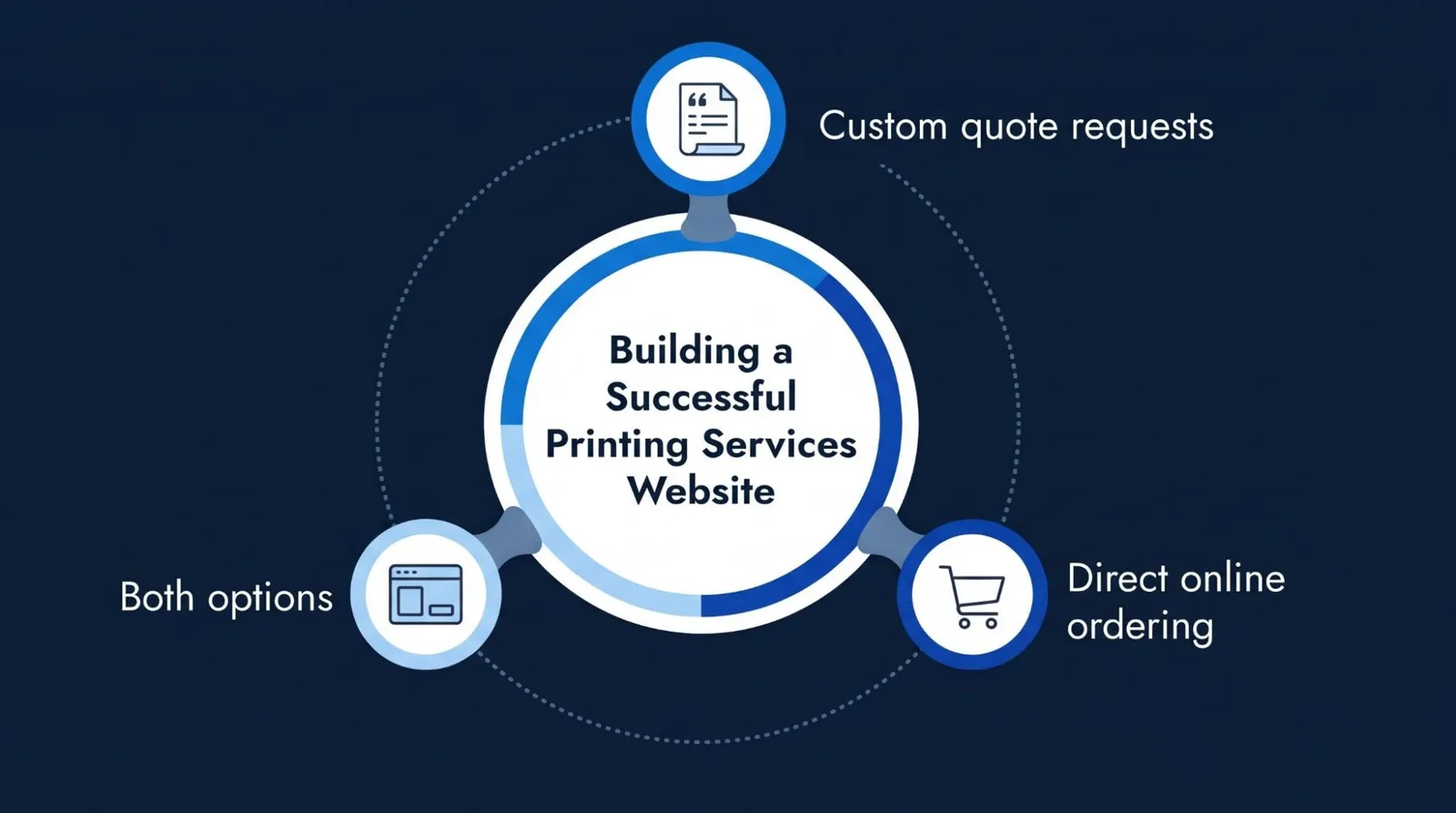
Decide which ordering model you need:
Ordering Model |
Development Requirements |
Custom quote requests |
Project forms, file uploads and inquiry management |
Direct online ordering |
Product configuration, pricing rules, cart and checkout |
Both options |
Separate paths for standard products and custom jobs |
List essential features before adding optional tools. This helps keep the project focused and gives developers a clear scope.
Also identify who will manage products, approve artwork and update orders. These responsibilities affect how the administration area should work.
2. Choose a Platform for Your Printing Company Website
Your platform should support your product catalog and ordering process. It should also be manageable for the people who will maintain it.
A content management system can support service pages, portfolios and quote requests. An ecommerce platform adds shopping carts, payment processing and order management.
More complex printing businesses may need custom development for pricing calculations or production workflows.
Compare your options against these requirements:
Product flexibility: Can the platform handle sizes, paper stocks, quantities and finishing combinations?
File handling: Can it accept artwork and connect each file to the correct inquiry or order?
Administration: Can staff update products and manage requests easily?
Integration support: Can it connect with the business systems you use?
Ongoing maintenance: Who will manage updates, backups and technical issues?
Choose the platform after reviewing these needs. A familiar platform is only useful if it can support your business process.
3. Build a Structured Print Product Catalog
A printing website needs more than a list of product names. Each product should have structured information that the website can use.
For business cards, this might include dimensions, paper stock, print sides and finishes. Booklets may also require page counts and binding options.
Develop reusable product fields. This makes information easier to update and keeps similar pages consistent.
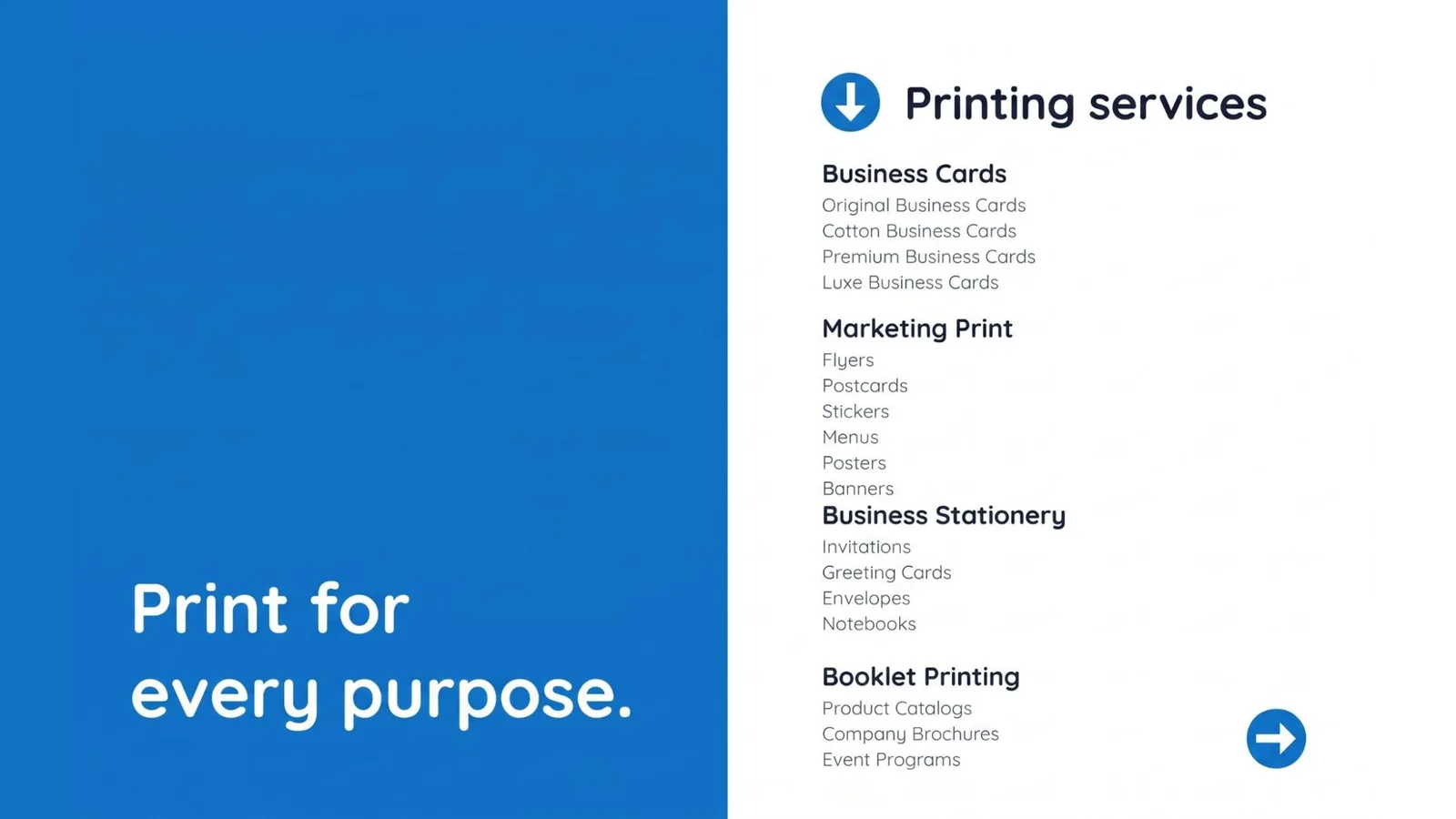
Organize products into clear categories such as:
Business cards and stationery
Flyers and brochures
Booklets and catalogs
Signs and banners
Labels and stickers
If your catalog is large, add search and useful filters. A customer should be able to find a product without browsing every category.
Keep discontinued products and unavailable options under control through the administration area.
4. Develop a Print Product Configurator
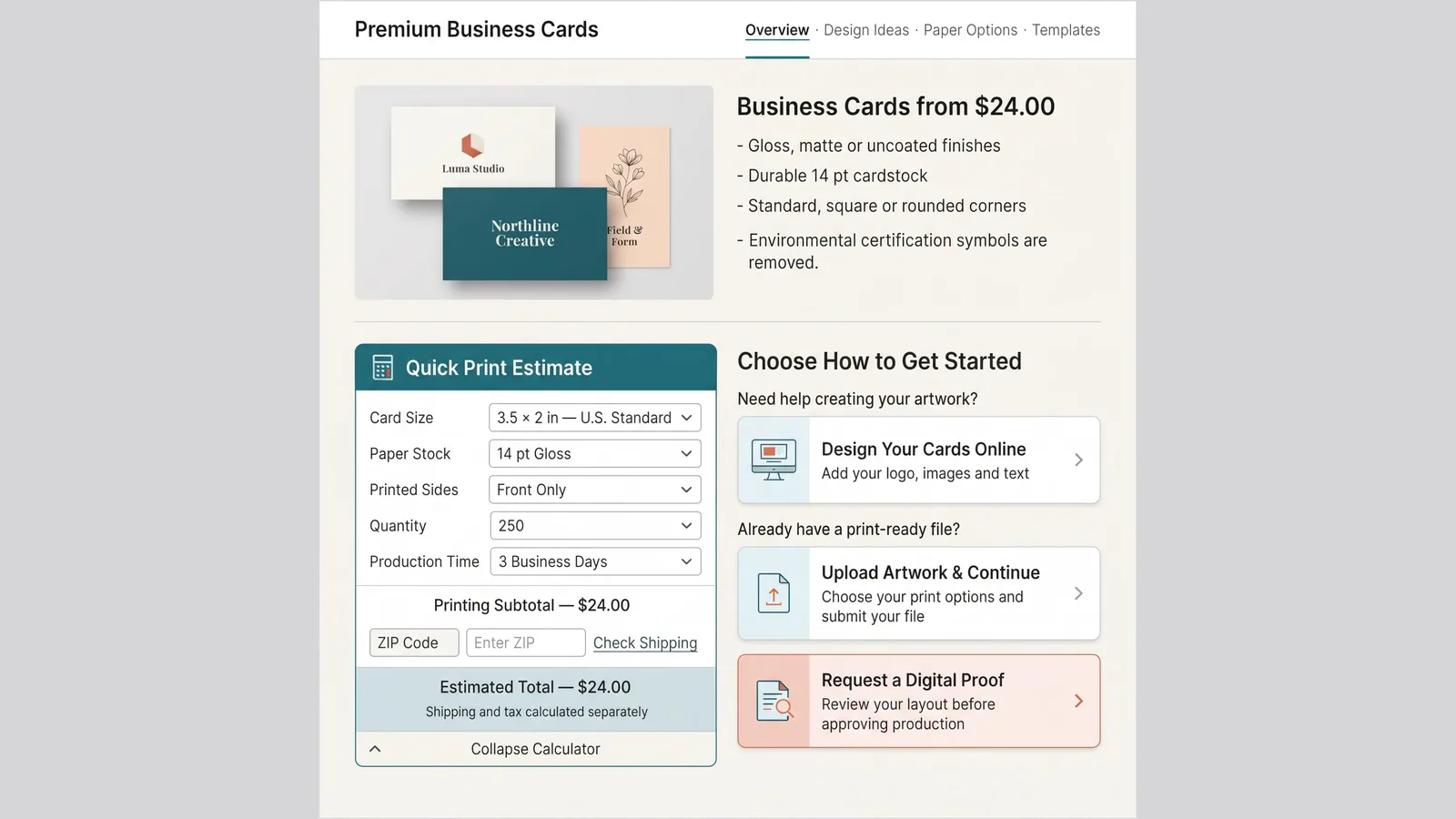
A product configurator lets customers choose the specifications for their order.
The development work should account for how those choices affect each other. A selected paper stock may support some finishes but exclude others.
For example, a booklet order may require customers to choose:
Finished size
Page count
Inside paper stock
Cover material
Binding method
Quantity
Build rules that prevent unsupported combinations. Explain restrictions beside the relevant option so customers can correct their selections.
Show a clear specification summary before the customer continues. This gives buyers a chance to catch mistakes before uploading artwork or paying.
5. Build Accurate Printing Price Calculations
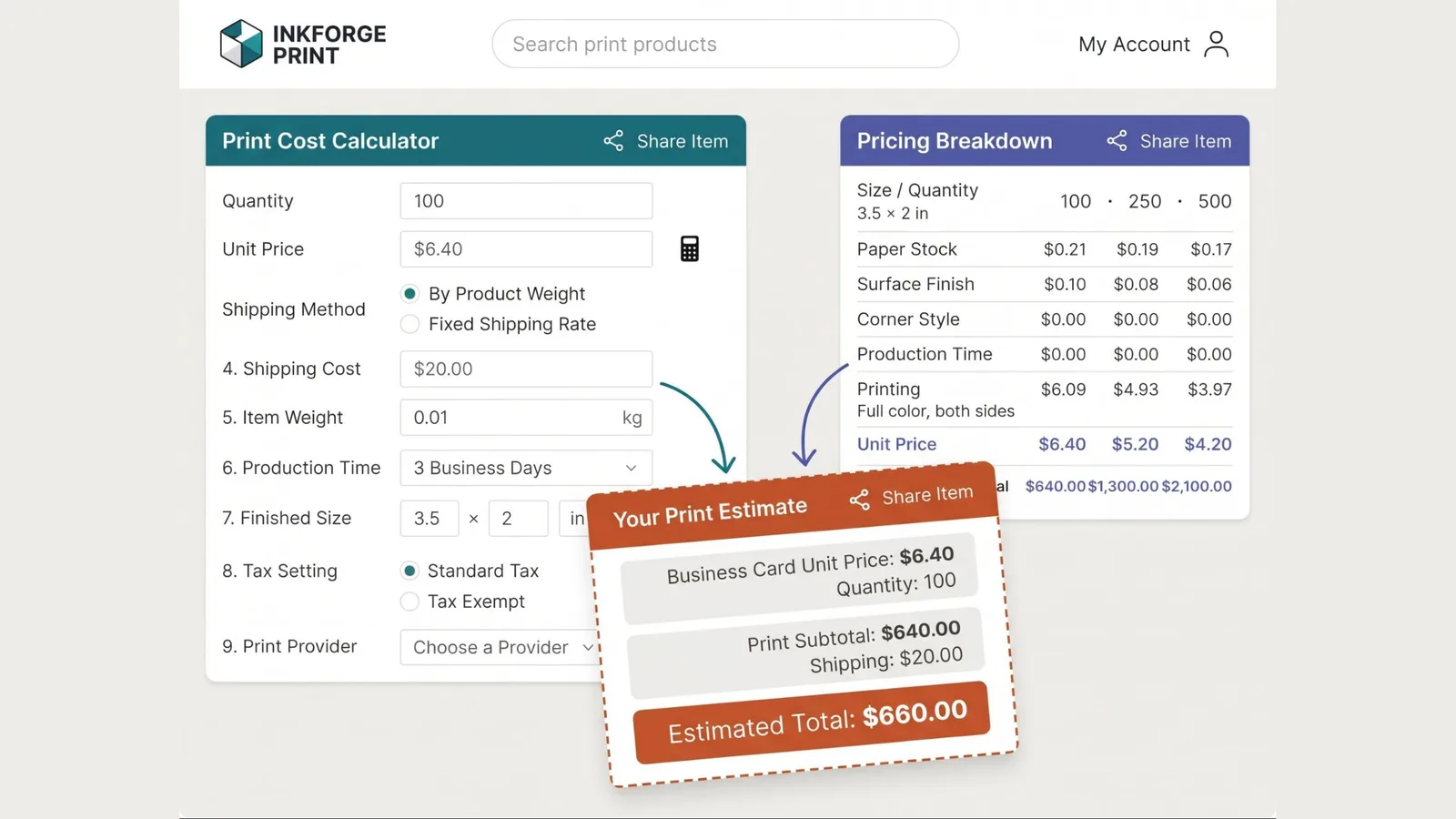
Online pricing should follow your actual pricing rules.
The calculation may depend on quantity, material, dimensions, printing sides and finishing. Some jobs may also include setup charges or additional services.
For standard products, developers can build pricing tables or connect the website to an approved pricing system.
Custom jobs may need manual review. Give those customers a quote request option instead of displaying an unreliable estimate.
Before launching instant pricing, test different combinations. Include small quantities, larger orders and products with multiple finishing selections.
Also decide how price changes will be managed. Staff should be able to update approved rates without editing website code for every adjustment.
6. Develop Custom Printing Quote Forms
Quote forms should collect details that help your team assess the job.
Use conditional fields so customers only see relevant questions. A banner inquiry may need mounting requirements. A booklet inquiry may need page count and binding preference.
Collect the essentials:
Required Detail |
Purpose |
Product type |
Identifies the requested service |
Dimensions |
Defines the finished size |
Quantity |
Supports pricing and production planning |
Material preference |
Helps assess suitable stock |
Finishing requirements |
Captures additional production steps |
Delivery location and date |
Helps assess fulfillment |
Artwork status |
Shows whether files are ready |
Validate entries before submission. If a required dimension is missing, explain what the customer needs to add.
Store the request in a system staff can access. Email notifications can alert the team, but the inquiry should remain available for review and follow up.
7. Add Artwork Upload and File Management Features
Artwork upload is a core part of printing website development.
Connect every uploaded file to its related quote, order or customer account. Staff should be able to identify which artwork belongs to each job.
The upload process should include:
Accepted file formats
File size limits
Upload progress
Clear success or failure messages
A way to replace incorrect artwork
Validate files on the server as well as in the browser. Restrict file access and avoid exposing customer artwork through public links.
For large files, consider a suitable file storage service. Plan what happens when an upload is interrupted so customers do not lose the rest of their order details.
Add an artwork status such as “Received,” “Under Review” or “Replacement Needed.” This helps staff manage the next step.
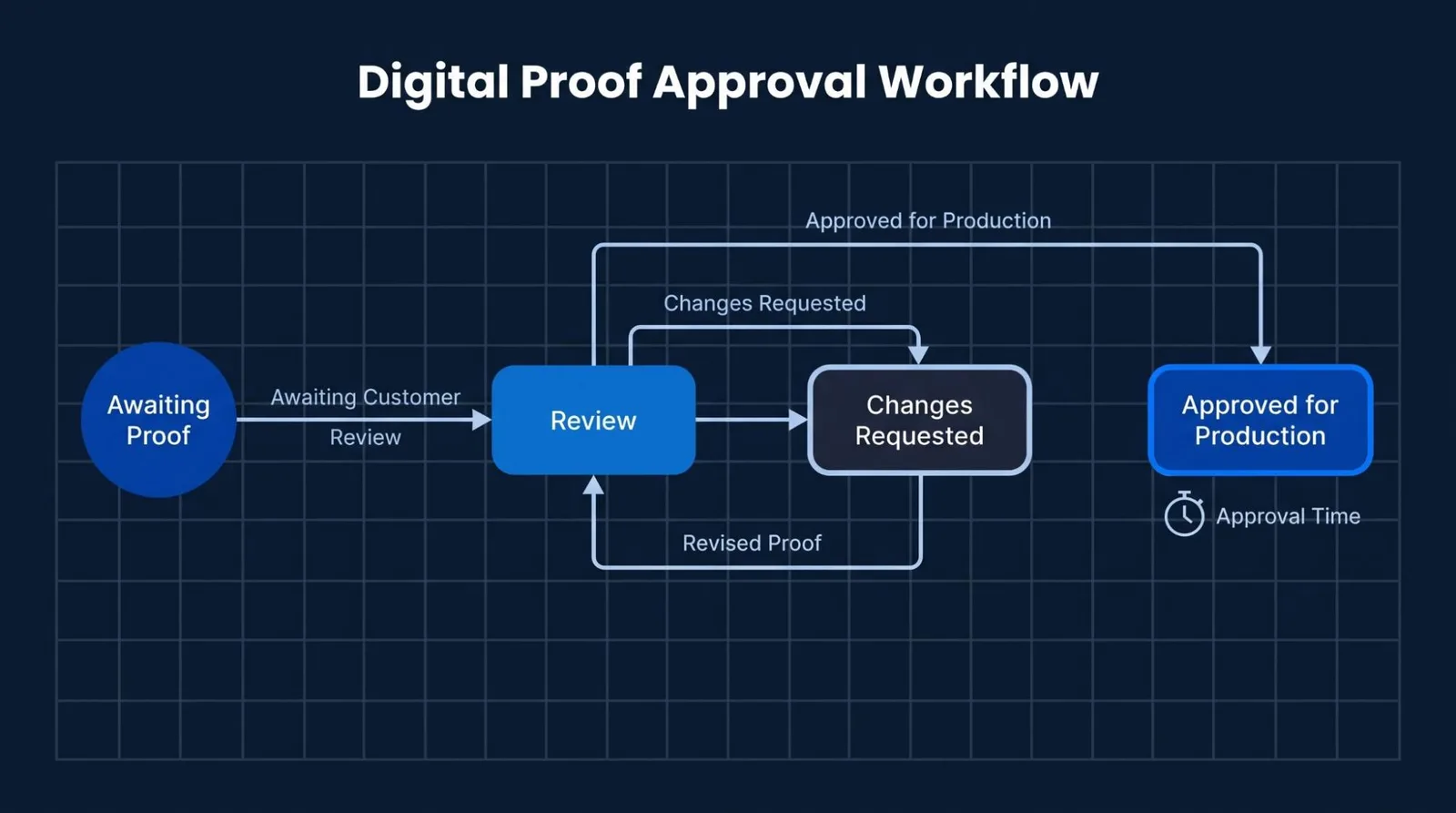
8. Create a Digital Proof Approval Workflow
A proof approval system gives customers a clear way to review artwork before production.
Develop a workflow that connects the proof to the correct order. Customers should be able to approve it or request changes.
Record the proof version, customer response and approval time. This helps your team identify which version is ready for production.
Useful proof statuses include:
Awaiting proof
Awaiting customer review
Changes requested
Approved for production
Make the approval action clear. Explain what the customer is confirming and whether their response affects the production schedule.
If a revised proof is uploaded, the system should distinguish it from earlier versions.
9. Build Checkout, Payment and Delivery Functions
For direct orders, checkout should collect the information needed to complete the purchase.
Connect a suitable payment gateway and test successful, failed and canceled payments. The website should update the order correctly after each outcome.
Show the selected specifications and applicable charges before payment.
Delivery functions may include shipping rates, local pickup or manual delivery quotes. The correct approach depends on your products and service area.
Separate production time from delivery time. Customers should understand whether the job must pass artwork review before production begins.
For custom quotes, you may need a payment link after the customer accepts the price. Connect that payment to the original job record.
10. Develop Customer Accounts and Reorder Tools
Customer accounts can support businesses that receive repeat printing orders.
An account area may include order history, saved addresses, invoices and proof approvals. Customers can return to review previous jobs without submitting the same details again.
A reorder feature should show the earlier specifications before confirmation. Buyers may need to change the quantity, artwork or delivery address.
Keep previous artwork clearly labeled. A customer should not accidentally reorder an outdated version.
Also consider guest ordering if an account is not essential. Requiring registration too early can add an unnecessary step for first time buyers.
11. Connect Your Printing Website With Business Systems
Integrations help move information between the website and your internal tools.
Depending on your workflow, these may include a CRM, accounting software, shipping platform or print management system.
An application programming interface, or API, can connect supported systems. Webhooks can notify another application when an event occurs, such as a paid order or approved proof.
Define which system controls each piece of information. For example, decide where staff should update the production status.
Plan for connection failures too. Log unsuccessful transfers and give staff a way to retry them.
Test integrations with realistic orders before relying on them for daily operations.

12. Improve Printing Website Performance and Accessibility
A website must remain usable across devices and connection speeds.
Optimize product photographs and load large galleries carefully. Keep production artwork separate from images displayed on public pages.
Test product selectors, upload controls and checkout on mobile devices. These functions often need more attention than basic content pages.
Accessibility should be part of development. Use proper form labels, keyboard controls and visible focus states.
Error messages should explain the problem and how to fix it. Preserve entered information when a form fails so customers do not have to start again.
13. Add Technical SEO During Website Development
Technical SEO helps search engines access and understand your public pages.
Create clear URLs for product categories and services. Add editable fields for page titles and meta descriptions within the CMS.
Development should also cover:
An XML sitemap
Appropriate indexing controls
Canonical URLs where needed
Working internal links
Redirects for replaced pages
Useful error pages
Keep private account areas and customer artwork protected from public access. Indexing controls alone do not protect confidential files.
If you are rebuilding an existing print shop website, map important old URLs to relevant new pages before launch.
14. Test and Maintain Your Printing Services Website
Test the full order process using realistic customer scenarios.
Submit a custom quote, configure a product and upload artwork. Review a proof, complete payment and confirm that staff receive the right information.
Check unusual situations as well. These include interrupted uploads, duplicate submissions and failed payments.
Before launch, confirm that backups work and staff understand the administration tools.
After launch, maintain the platform, review failed transactions and check form delivery. Monitor where customers abandon quote forms or checkout.
Use those findings to improve the website as your printing business grows.
Develop a Printing Website That Fits Your Workflow
A professional printing website should connect customer requests with the work your team needs to complete. Product configuration, artwork handling, proof approval and order management all need to function together.
The Custom Websites can help plan and develop these features around your printing business. Explore our printing website development services to discuss your catalog, ordering process and integration needs.